Capability: Programme
A job programme built from the quote and shared with the client
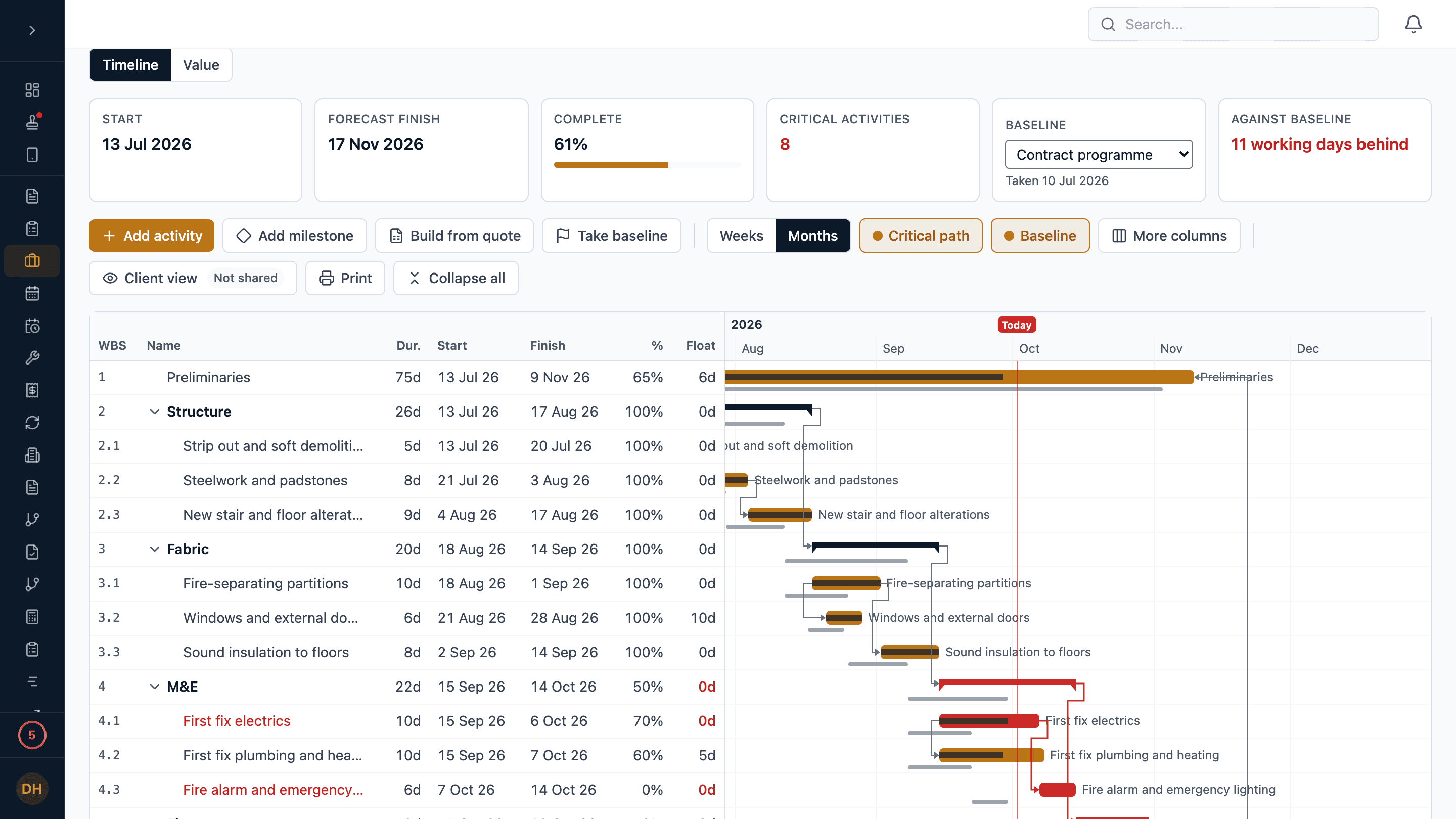
Every job in Estimark has a programme: a Gantt chart with activities and milestones, the four kinds of link, the critical path and baselines, built in one step from the priced sections of the quote. Once work starts it forecasts the finish from the progress recorded on site, from the web or either phone app. The value view sets planned against earned against actual cost, your client can follow the programme in their portal, and it prints on your letterhead.
Why the programme on the wall is always wrong
The programme lives in a file nobody updates
Drawn once for the tender, emailed as a PDF, and out of date by the second week.
Slippage turns up at the progress meeting
Nobody moved the bars, so the handover date on the wall is still the one in the contract.
The client rings to ask where things are
Every “when does the kitchen go in?” is a phone call, because the client cannot see the plan.
Late and over budget look the same from the office
Without the value of the work set against the plan, a job that is behind and a job that is losing money are one vague worry.
Capability: how it works
How does Estimark build a job programme?
From the quote, in one step, or by hand. Build from quote makes one activity for each priced section of the job’s quote, in order, each following the one before, with Practical Completion at the end, and shares out the weeks you give it by each section’s value.
- Tasks, milestones and summaries in a tree, so a stage can be broken into detail later without losing its links.
- Finish-to-start, start-to-start, finish-to-finish and start-to-finish links, each with a lag or a lead in working days.
- A link that would make a loop is refused, and the message names what is in the loop.
- Scheduled on working days: Monday to Friday, less the England and Wales bank holidays.
- The critical path is drawn in red: the work with no room to slip before the finish moves.
How does the job programme track progress and slippage?
Take a baseline and the programme measures against it: each activity, and the job, shows how many working days it is ahead or behind. Once work has started the dates are a forecast. Work not yet started cannot start in the past, work in progress finishes no sooner than what is left of it, and a job falling behind shows it without anybody moving a bar.
- Whoever an activity is assigned to records its progress, on the web or in the iPhone or Android app, with a note that goes under the activity’s notes.
- Giving somebody an activity puts them on the job, so they can clock in and out there and book their hours to it.
- Work, then Programme lists every live job with its forecast finish, its slip against the baseline and how much is done, the job furthest behind first.
- Take a snapshot of every job’s dates at once, and see later which have moved.
What is the value view on the job programme?
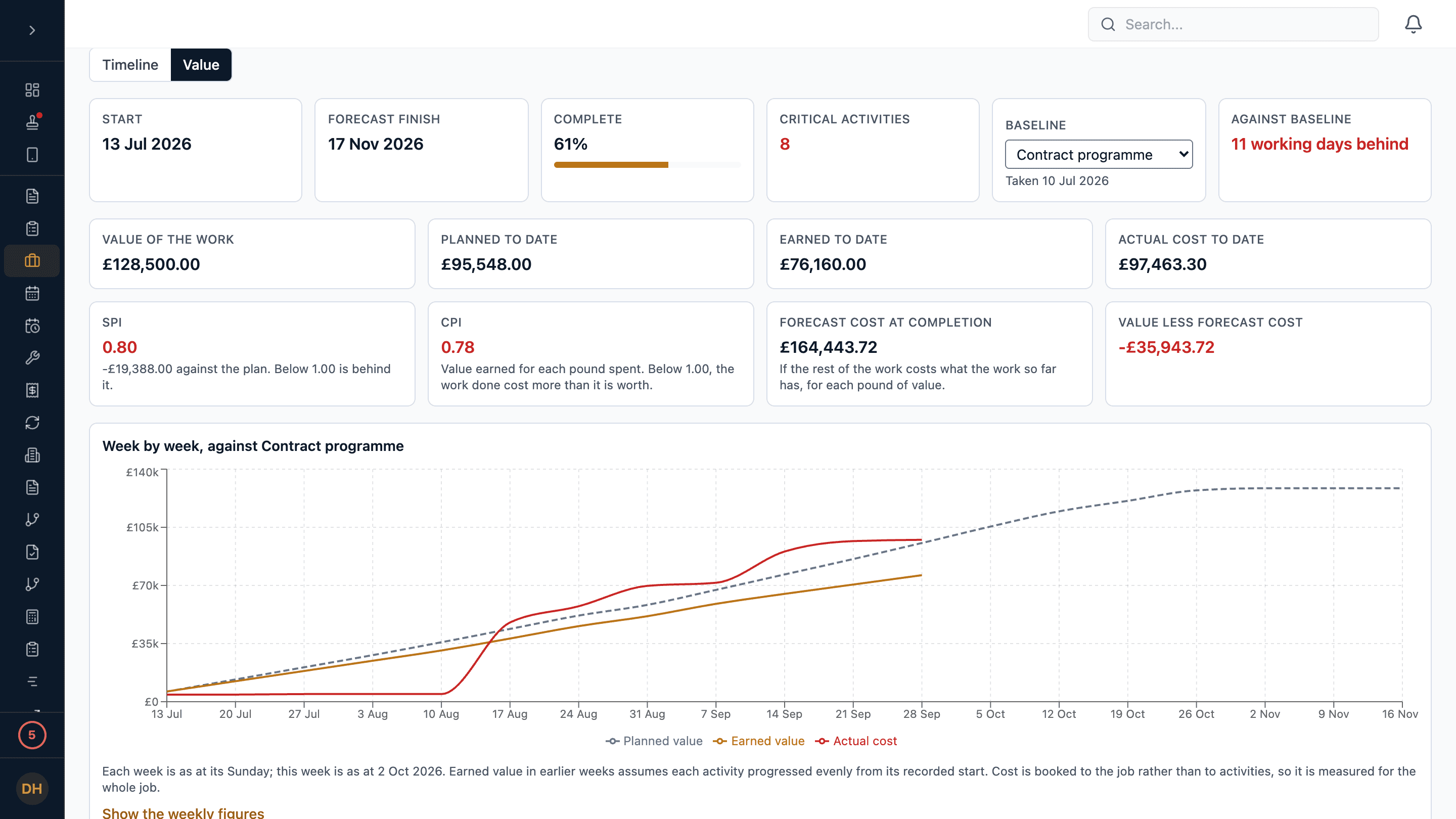
Planned against earned against actual. Planned value is the work that should have been done by now, earned value the work that has been done, and actual cost what the job has cost, the same figure job costing and the CVR show. They are drawn week by week as an S-curve and listed activity by activity, with SPI, CPI and the forecast cost at completion.
- An activity’s value is its price. Building from the quote values each stage with the overheads and profit spread across them, so the values add up to the contract sum.
- SPI below 1.00 means the job is behind its plan. CPI above 1.00 means the work done has earned more than it cost.
- A figure that cannot be measured yet says why, rather than showing a zero.
- Only people who can see job costs see the value view. Everybody else on the job sees the dates.
Can my client see the job programme?
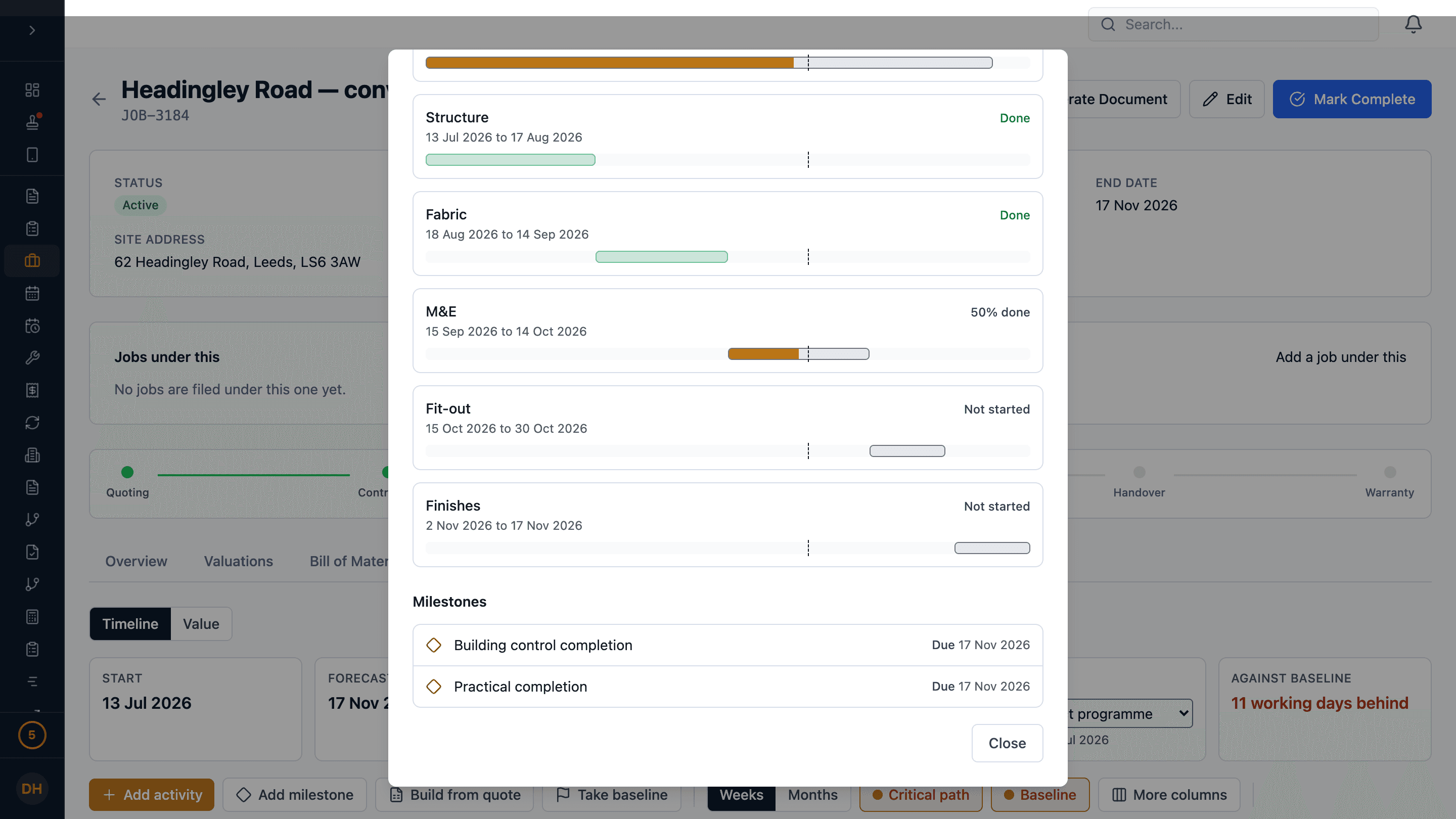
Yes, in the client portal, on its Progress tab. You choose in Settings whether clients see programmes job by job, for every job that has one, or not at all, and each job’s Client view shows exactly what its client sees.
- The client sees the planned and the forecast finish, how far through the job is, the stages with their dates and progress, and the milestones and whether each is done.
- Your notes, who is doing what, trades, float, the critical path, baselines and values are never shown to the client.
- If a programme would not reach the client yet, the Client view says why: the quote has no portal link, the job did not come from a quote, or your plan does not include the portal’s project pages.
NoteThe client portal’s project pages are included from Core up.
Can I print the job programme?
Yes, as a PDF on your letterhead, landscape on A3 or A4. The full programme is for your own meetings: every activity with its dates, float and progress, the critical path, the baseline under each bar and the milestones. The client’s version is what the portal shows.
- Drawn to print clearly in black and white, with the column headings repeated on every page.
- Both phone apps open either version on A4, to send to the client or print.
- Neither version carries prices.
What does the job programme not do?
It is a programme for running your jobs, not a planning package for a major project.
- It does not import or export Microsoft Project or Asta files.
- It does not level resources across jobs. Who is where each day is on the Schedule.
- It works to the England and Wales bank holidays, wherever the job is.
- Planning is on the web. The phone apps show the programme, record progress and open the PDF; they do not change the plan or share it.
The programme, in detail
- Links
- FS, SS, FF and SF, with lags and leads
- Calendar
- Working days, England and Wales bank holidays
- Built from
- The quote’s priced sections
- Baselines
- Slip shown in working days
- Value
- Planned, earned and actual, SPI and CPI
- Client
- Portal Progress tab, by job or every job
- PDF on your letterhead, A3 or A4
- Phones
- iPhone and Android: progress and print
Every plan
Included
The programme comes with every plan. Showing it to your client in the portal needs the portal’s project pages, included from Core up.
What you get
- A Gantt programme for every job, built from its quote
- Dependencies, the critical path and baselines
- Progress from the web and both phone apps
- Planned, earned and actual value for those who see costs
- Every live job’s programme on one page
- A printed PDF, full or the client’s version
Questions
Job programme: frequently asked
Does Estimark have Gantt chart software for construction?
Yes. Every job has a programme drawn as a Gantt chart: activities and milestones, the four kinds of link with lags, the critical path in red, baselines under the bars, and progress. It can be built from the quote’s priced sections in one step, and once work starts it forecasts the finish from the progress recorded on site.
Can site staff update the programme from their phone?
Yes. In the iPhone and Android apps a job’s programme lists this week’s work, what is coming up and what is done, and whoever an activity is assigned to records its progress with a note, with or without a signal. Changing the plan itself is done on the web.
Can my client see the programme without a login?
Yes, through the client portal link for the quote the job came from, on its Progress tab. You choose whether clients see programmes job by job, for every job, or not at all. They see stages, milestones, progress and finish dates, not your notes, your costs or the critical path.
Does Estimark import Microsoft Project files?
No. Estimark does not import or export Microsoft Project or Asta files. A programme is built from the quote or drawn in Estimark, and printed or shared from there.
Related
Job costing & CVR
Where the actual cost in the value view comes from.
Client Portal
Where your client sees the programme, the photos and the variations.
Tour: run the job
The job board, the week’s schedule, variations and the programme.
Pricing
What each plan costs and what it includes.
Try it on a real job.
14 days, full access, every plan. No implementation fee. All prices exclude VAT, added at 20% at checkout.