Step 8 of 15 · Site Hub
Put the board on the cabin wall
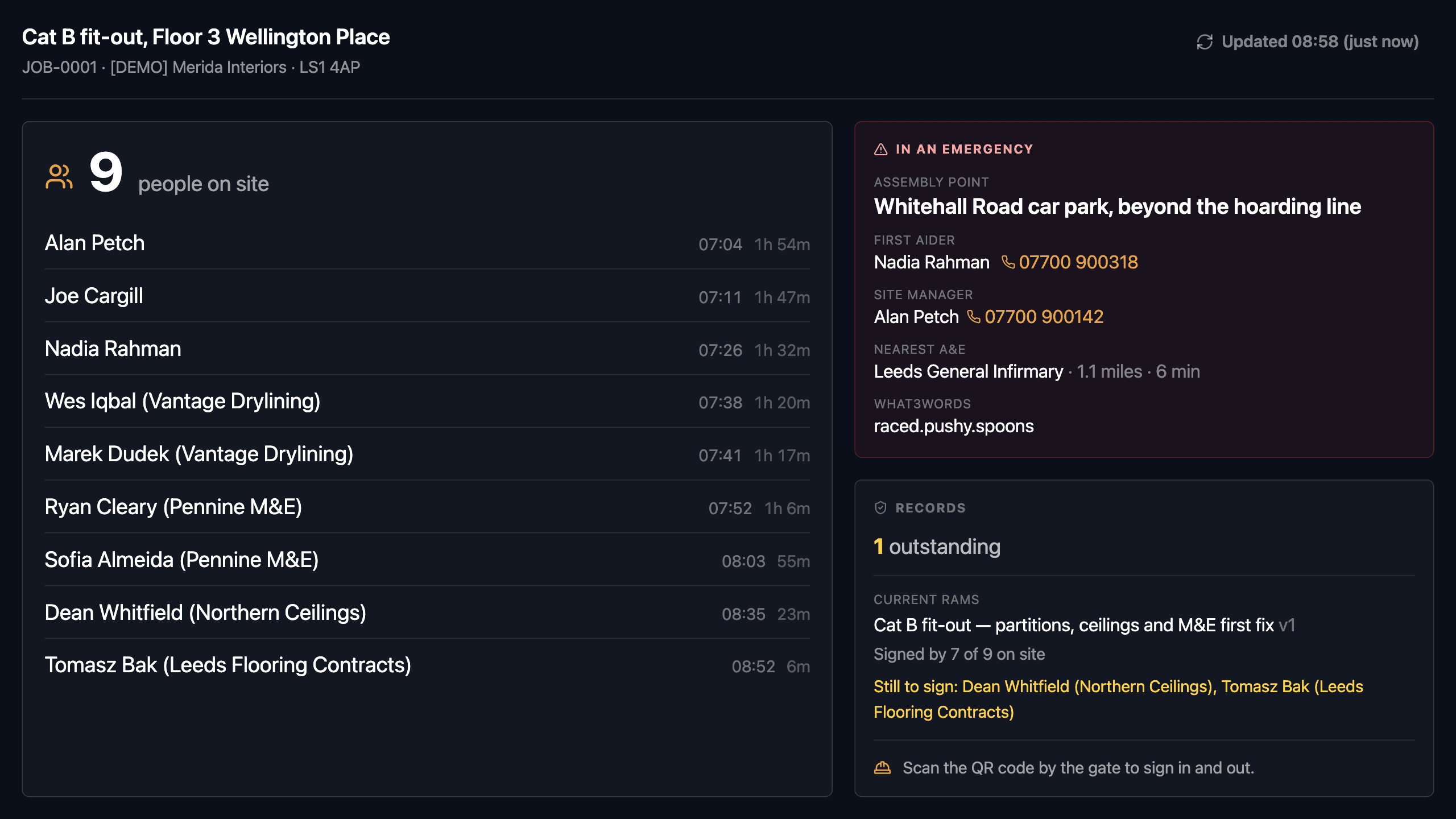
A site attendance board answers the one question a site cabin needs answered, which is who is on this site right now, and the Site Hub puts that answer on a tablet mounted on the wall. The tablet is nobody’s login. It enrols once with an eight-character code and then authenticates as a device scoped to a single job, so it can read that site’s file and nothing else. The board shows the count and the names with the time each person signed in, the emergency card with the assembly point and the first aiders, and how many of the people standing on site have signed the current RAMS version. It states the age of its own data at all times, and it is a read-only board: nothing is entered on it.
- 01
What is actually on the screen?
The number of people on site, in the largest type on the board, then a line each for them: the name, the time they signed in and how long they have been on site, oldest sign-in first because that is roll-call order. It refreshes every thirty seconds. Beside the list, the emergency card and a records panel. The whole thing is sized to be read at three metres by somebody in a hard hat, because the moment it has to earn its keep is the moment a fire marshal is reading names out at the assembly point.
- 02
Where do people actually sign in and out?
At the QR code by the gate, on their own phone, which is the same attendance scan covered earlier in this tour. The Hub is a read-only board: it displays the instruction to go and scan, and then the list that scanning produces. Signing the current RAMS happens at that gate too. The Hub reports the position, naming the current version and saying how many of the people on site have signed it, and listing the first few who have not.
- 03
What is on the emergency card, and what if it is half filled in?
The assembly point, the first aider, the site manager, the nearest A&E and how far it is, and the what3words for the gate, the thing an ambulance control room asks for on a site with no street number yet. Phone numbers are tap-to-dial. A gap reads "Not recorded yet" in amber rather than being hidden, because a card naming only the assembly point is worth more than a blank one, and the hole has to be visible to somebody before it matters. The office fills it in per site.
- 04
How does a tablet get set up if it has no login?
Somebody in the office adds the tablet on the Site Hub Tablets screen, and Estimark shows an eight-character enrolment code once. Typed into the tablet, that code is traded for a device token that is stored hashed and scoped to one job. Codes last 24 hours, work once, and leave out the characters people misread. From the same screen you can reissue a code, move a Hub to another site, or revoke a tablet that has gone missing, which kills its token and clears what it had cached.
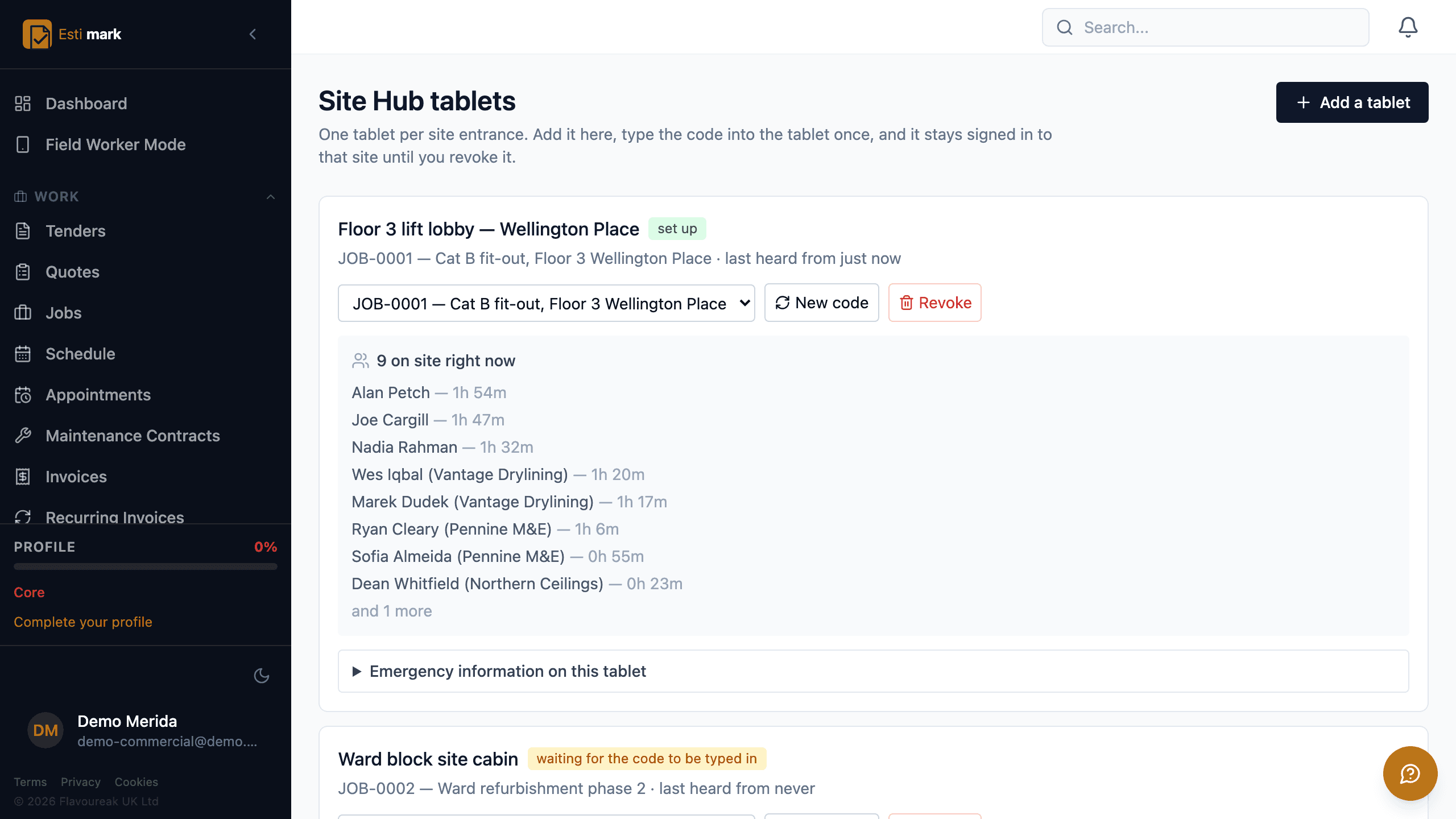
The office side of the Site Hub, listing the tablets on one site: the first is set up and showing its live board, and the second is still waiting for its enrolment code to be typed in, with its last contact shown as never. - 05
What happens when the site has no signal?
The board keeps showing what it last fetched and says when that was. The header carries the time of the last successful read at all times rather than only when something is wrong, and it turns amber past fifteen minutes. The site file is cached on the tablet, so a reboot after the site power goes off overnight comes back to a board rather than to an error page. The kiosk app boots straight into it, holds the screen on, and locks the tablet to the board using Android lock task mode.
- Enrolment
- Eight characters, 24 hours, single use
- Refresh
- Every 30 seconds, with the age on screen
- Kiosk
- Android lock task, boots into the board
What this step does not do
- Nobody clocks in on the Hub. Workers sign in on their own phone at the QR code by the gate, and the Hub displays that instruction and the list it produces.
- RAMS are not signed on the Hub. It reports how many of the people on site have signed the current version, and the signature itself is given at the gate.
- Deliveries are not booked in on the Hub, and neither are goods received against a purchase order. Both are done in the office system against the order that ordered them.
- Documents and drawings are not on the Hub. Its screen is the attendance list, the emergency card and the record counts, and nothing else.
- There is no visitor book on the Hub. Visitors are not modelled yet, so nobody is shown as a visitor and everybody on the list came through the gate scan.
- Nothing is entered on the Hub, so there is nothing for it to queue offline. Work captured with no signal is captured on the phones instead, and sent when the signal returns.
- The Hub states no compliance verdict. It counts outstanding records and names the current RAMS version. Whether the site is safe is a judgement about the physical site, and it belongs to the people standing in it.
Questions
Site Hub, frequently asked
Do workers clock in on the Site Hub tablet?
No. They sign in on their own phone at the QR code by the gate, and the Hub displays the instruction to go and scan and then the list that scanning produces. The tablet is a read-only board.
Does the board still work when the site has no signal?
It keeps showing what it last fetched and says when that was, and the header turns amber past fifteen minutes. The site file is cached on the tablet, so a reboot after the site power goes off overnight comes back to a board rather than to an error page.
RAMS, inspections and the actions that come out of them are recorded as they happen, and Estimark holds the record rather than the verdict.
Build on a solid foundation.
Run the whole business without an implementation project and without legacy baggage. Every plan starts with 14 days free.
Estimating · Jobs · Invoicing · CIS · H&S · Reactive maintenance